Is Pinterest Safe For Kids? Parental Controls, Risks & Age Restrictions Guide
Is Pinterest safe for kids is a question every parent should be asking in 2025. As parents navigate the digital landscape, understanding the potential risks and benefits of platforms like Pinterest is crucial for ensuring child safety online. This Blog post will delve into Pinterest’s safety features, examine the types of content children might encounter, discuss parental control settings, and provide practical tips for monitoring your child’s activity on the platform. Ultimately, we aim to provide you with the information needed to make informed decisions about your child’s use of Pinterest and foster a safe online experience.
Is Pinterest Really Safe for Kids? A Comprehensive Overview
Navigating the digital world with children requires a keen understanding of the platforms they use, and a common question among parents is: Is Pinterest safe for kids? While Pinterest offers a wealth of creative inspiration and educational resources, it’s essential to examine the platform’s safety measures, potential risks, and how parents can create a secure online experience for their children. This overview aims to provide a balanced perspective, exploring both the benefits and the challenges of allowing children to use Pinterest.
Pinterest’s appeal to children stems from its visually engaging format and diverse content, ranging from art projects and recipes to fashion and home décor ideas. The platform functions as a virtual bulletin board where users can “pin” images and videos they find interesting, creating personalized collections and discovering new interests. However, this open platform also presents potential exposure to inappropriate content, online interactions with strangers, and other risks that necessitate parental awareness and intervention.
To determine whether Pinterest is a suitable platform for your child, it is vital to consider the platform’s age requirements, community guidelines, and available parental control features. Understanding these aspects will empower parents to make informed decisions about their child’s online safety and implement strategies to mitigate potential risks. By taking a proactive approach, parents can help their children safely explore the creative possibilities that Pinterest offers while minimizing exposure to harmful content and interactions.
Potential Risks of Pinterest for Children: What Parents Need to Know
As parents consider whether Pinterest is safe for kids, it’s crucial to understand the potential risks this visually-driven platform presents to young users. While Pinterest can be a source of inspiration and creativity, it’s essential to be aware of the potential dangers lurking beneath its seemingly harmless surface.
One of the primary risks for children on Pinterest is exposure to inappropriate content. Pinterest’s algorithm, while designed to personalize user experiences, can inadvertently lead children to content that is sexually suggestive, violent, or otherwise unsuitable for their age. This can include images and videos that promote harmful stereotypes, dangerous challenges, or even self-harm. For instance, a child searching for DIY crafts might stumble upon content related to eating disorders or dangerous “life hacks.” Parents should regularly monitor their child’s activity to ensure they are not being exposed to such content.
Another significant concern is the potential for cyberbullying and online harassment. Like any social media platform, Pinterest can be a breeding ground for negativity and aggression. Children may be targeted by other users who leave hurtful comments, spread rumors, or engage in other forms of online abuse. According to a 2023 study by the Cyberbullying Research Center, approximately 37% of young people between the ages of 12 and 17 have experienced cyberbullying. It’s vital to teach children how to identify and respond to cyberbullying, and to encourage them to report any incidents to a trusted adult.
Furthermore, Pinterest can contribute to unrealistic expectations and body image issues. The platform is filled with curated images of perfect homes, flawless bodies, and idealized lifestyles. Children may begin to compare themselves to these unrealistic standards, leading to feelings of inadequacy, anxiety, and depression. Research has shown a correlation between social media usage and body dissatisfaction, particularly among young girls. Parents can help mitigate this risk by having open and honest conversations with their children about the realities behind social media images and encouraging them to focus on their own strengths and accomplishments.
Finally, the risk of data privacy and online predators should not be overlooked. Pinterest, like other social media platforms, collects user data that can be used for targeted advertising and other purposes. Children may not fully understand the implications of sharing personal information online, making them vulnerable to exploitation. Moreover, predators may use Pinterest to identify and groom potential victims. Parents should ensure their children are using strong passwords, limiting their sharing of personal information, and being cautious about interacting with strangers online.
Age Requirements and Guidelines on Pinterest: Understanding the Rules
Understanding Pinterest’s age requirements and community guidelines is paramount to ensure a safe online experience, particularly when considering is pinterest safe for kids. These regulations are designed to protect younger users and foster a positive environment for everyone on the platform. This section will delve into the specific rules Pinterest has in place regarding age limits, acceptable content, and user conduct.
Pinterest’s core policy dictates that users must be at least 13 years old to create an account. This age restriction aligns with the Children’s Online Privacy Protection Act (COPPA) in the United States and similar regulations in other countries, aiming to protect children’s privacy and data. It’s crucial for parents to be aware that underage users are technically violating Pinterest’s terms of service, potentially leading to account suspension if discovered.
Beyond the age limit, Pinterest’s Community Guidelines further define appropriate behavior and content. These guidelines prohibit:
- Hate speech and discrimination: Content that promotes violence, incites hatred, or disparages individuals or groups based on race, ethnicity, religion, gender, sexual orientation, disability, or other protected characteristics.
- Graphic violence and harmful content: Images or videos depicting explicit violence, self-harm, or dangerous activities.
- Sexual exploitation of children: Any content that sexualizes, endangers, or exploits children.
- Misinformation and spam: Spreading false or misleading information, engaging in spamming activities, or impersonating others.
Parents should be aware that while Pinterest actively moderates content, some inappropriate material may still slip through. This is why parental guidance and monitoring are essential, even if a child meets the minimum age requirement. Understanding these Pinterest rules is the first step in safeguarding children’s online experiences on the platform.
Key Parental Control Features on Pinterest: A Step-by-Step Guide
Pinterest, while a hub for inspiration and creativity, necessitates careful oversight when used by children; this section provides a step-by-step guide to leveraging key parental control features to ensure a safe experience on Pinterest for kids. Understanding and implementing these parental controls is crucial for mitigating the potential risks associated with the platform and fostering a healthy online environment for your child; many parents wonder is pinterest safe for kids, so these safety measures, including content filtering and activity monitoring, can provide peace of mind. By proactively managing your child’s Pinterest account, you can safeguard them from inappropriate content, cyberbullying, and other online dangers.
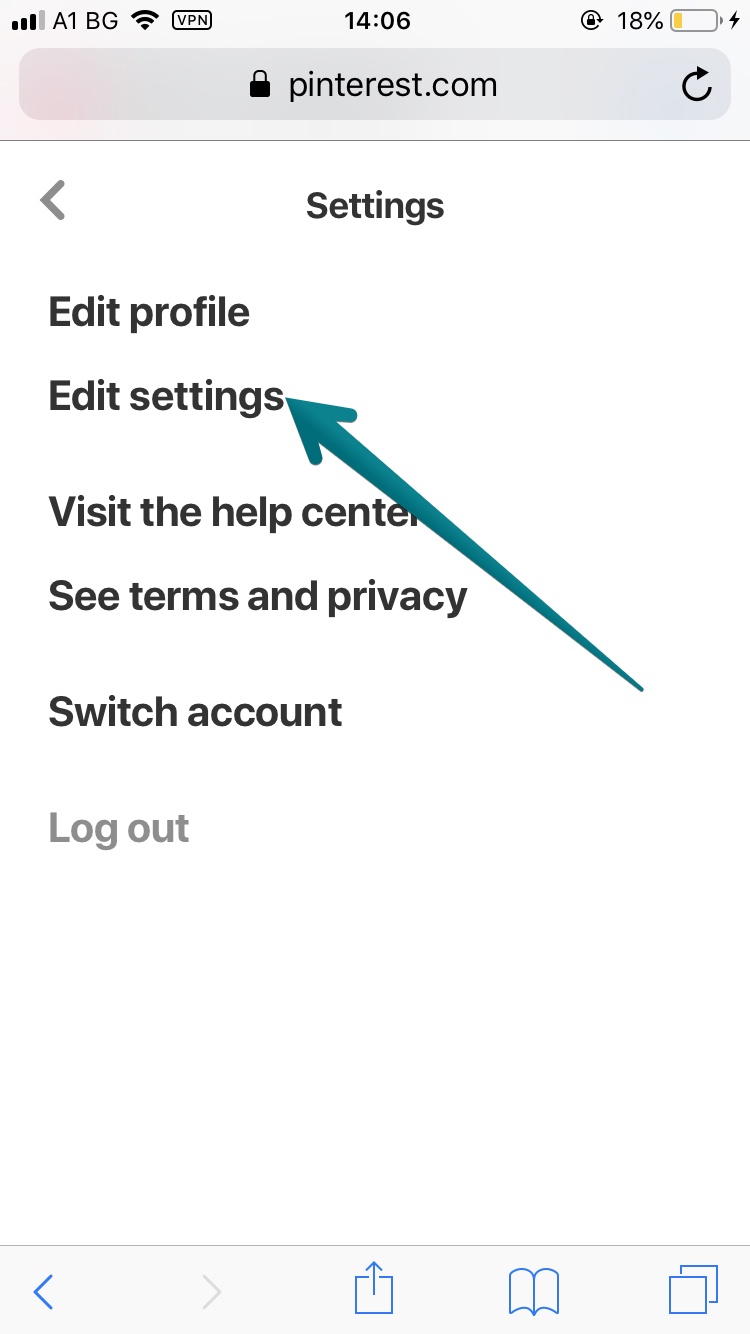
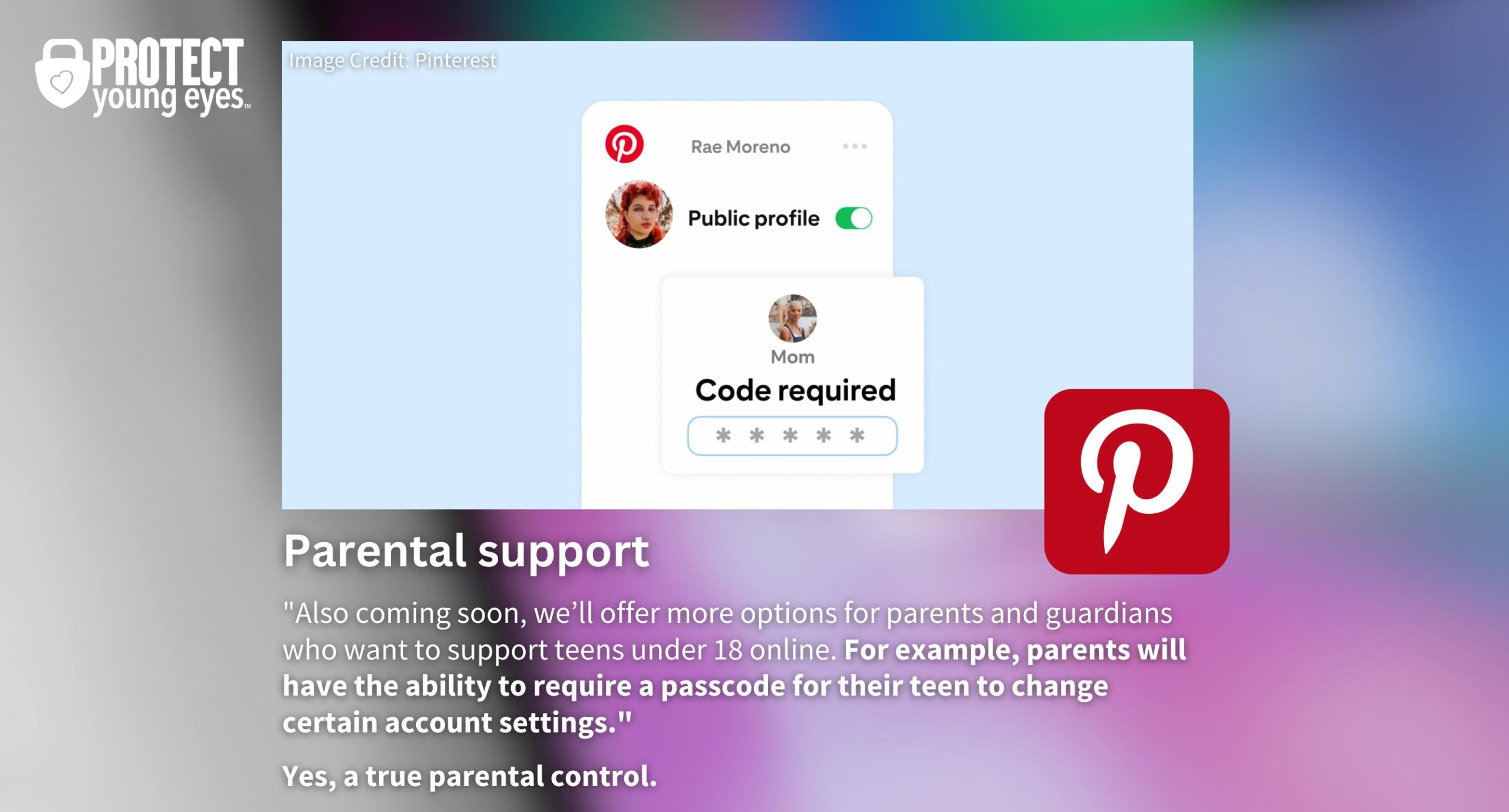
Pinterest offers several built-in tools that empower parents to manage their child’s experience; the most important feature is the ability to create a private account. A private account ensures that only approved followers can view your child’s pins and boards, significantly reducing exposure to unwanted interactions and potentially harmful content. To make an account private, navigate to Settings > Privacy and Data and toggle the “Private Account” option.
Another vital parental control is the ability to block specific users. If your child encounters someone exhibiting inappropriate behavior or sharing harmful content, blocking them prevents any further interaction. This can be done by visiting the user’s profile and selecting “Block” from the options menu; prompt blocking is extremely important for maintaining your child’s peace of mind on the social network.
Pinterest also offers tools for reporting inappropriate content. Encourage your child to report anything that makes them uncomfortable or violates Pinterest’s Community Guidelines. You can also report content on their behalf by clicking the “…” icon on a Pin or Board and selecting “Report pin” or “Report board.”
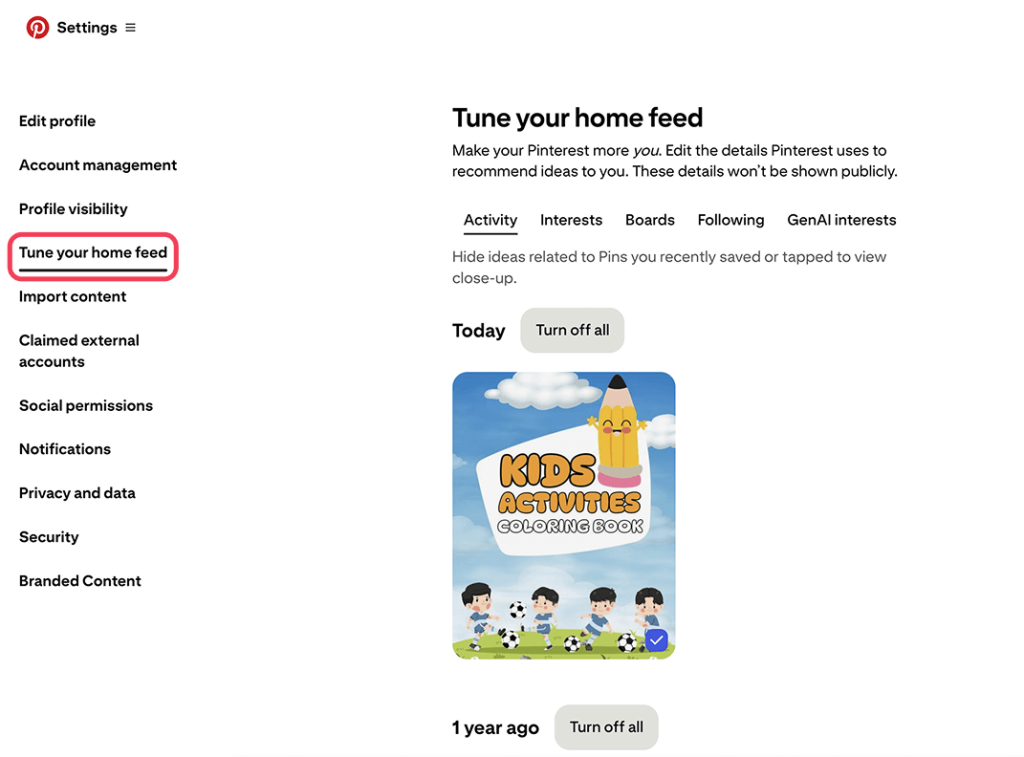
Finally, parents should regularly review and adjust their child’s home feed tuning. The home feed shows a stream of recommended pins. You can use the tool to help decide what the children can and cannot see on their feed. The platform allows you to hide pins and topics that you don’t want them to view; this is a really important step toward content filtering.
Setting Up a Safe Pinterest Account for Your Child: Practical Tips
Creating a safe Pinterest account for your child requires a proactive approach, ensuring they can explore the platform’s creative potential while mitigating potential risks associated with online content. Prioritizing your child’s safety on platforms like Pinterest starts with understanding the practical steps you can take.
Here’s a checklist of essential tips for setting up a secure Pinterest experience for your child:
- Create a Private Account: By default, make your child’s account private so that only approved followers can see their boards and pins.
- Strong Password: Establish a strong, unique password that is difficult to guess, and ensure your child understands the importance of keeping it private.
- Enable Two-Factor Authentication: Add an extra layer of security by enabling two-factor authentication, which requires a code from your phone or email in addition to the password.
- Age Verification: While Pinterest has age restrictions, it’s important to verify your child’s age accurately to ensure appropriate content filtering.
- Turn off Search Engine Indexing: You can turn off search engine indexing so that your child’s profile doesn’t show up on Google or any search engine.
One of the most crucial steps is to customize privacy settings. Navigate to the account settings and explore options like: controlling who can send messages, comment on Pins, or follow your child’s account. Limit these interactions to known contacts or disable them altogether if necessary. By taking these preventative actions, you can significantly minimize the potential for unwanted contact or exposure to inappropriate content, therefore reinforcing child safety online.
Actively managing who your child follows is also essential. Encourage them to follow accounts that align with their interests and values while avoiding accounts that promote mature or questionable themes. Regularly review the accounts they are following and unfollow any that seem unsuitable. Additionally, educating your child about the importance of reporting inappropriate content and blocking users is vital for maintaining a safe online environment. This proactive monitoring helps ensure your child’s Pinterest usage remains positive and age-appropriate.

Monitoring Your Child’s Pinterest Activity: Best Practices and Tools
Ensuring is pinterest safe for kids involves diligently monitoring your child’s Pinterest activity, a crucial step for parents concerned about their children’s online experiences. By staying informed about their child’s interactions, interests, and the content they’re exposed to, parents can proactively address potential risks and foster a safer online environment. This proactive approach allows parents to understand better the content their children are viewing and interacting with, directly contributing to the overall online safety for kids.
Several best practices can help you effectively monitor your child’s Pinterest usage:
- Regularly Reviewing Their Boards and Pins: Make it a habit to check your child’s Pinterest boards and saved pins. This gives you insight into their interests and the type of content they are engaging with. Look for any content that seems inappropriate, unsafe, or inconsistent with your family’s values.
- Checking Their Following and Followers: Pay attention to who your child is following and who is following them. Unfamiliar accounts or accounts with suspicious content might be red flags. Discuss the importance of only following people they know and trust in real life.
- Monitoring Their Search History: Reviewing their search history can reveal what topics your child is exploring on Pinterest. This information can help you understand their interests and identify any potentially harmful searches they might be conducting.
- Enabling Pinterest’s Activity Log (If Available): Check if Pinterest offers an activity log that tracks your child’s actions on the platform. This log can provide a detailed record of their pins, comments, and other interactions.
Beyond manual monitoring, several tools can assist you in keeping track of your child’s online activity:
- Pinterest’s Built-in Parental Controls: As discussed in the “Key Parental Control Features on Pinterest” section, utilize Pinterest’s native tools, such as the ability to make accounts private and filter content.
- Third-Party Monitoring Apps: Consider using parental control apps like Qustodio, Net Nanny, or Bark. These apps offer a range of features, including website filtering, screen time management, and activity monitoring. They can provide detailed reports on your child’s Pinterest usage and alert you to any potential issues.
- Open Communication: Foster an open dialogue with your child about their online experiences. Encourage them to come to you with any concerns or questions they have about content they encounter on Pinterest. This is perhaps the most effective tool, as it empowers your child to make informed decisions and seek help when needed. Discuss the importance of reporting inappropriate content and blocking users who make them feel uncomfortable.
By implementing these monitoring practices and utilizing available tools, parents can take an active role in ensuring that their children have a safe and positive experience on Pinterest. Combining technological solutions with open communication creates a comprehensive approach to online safety.
Educating Your Child About Online Safety on Pinterest: Important Conversations to Have
Discussing online safety with your children is paramount, especially when they engage with platforms like Pinterest, and these important conversations can empower them to navigate the digital world responsibly. Understanding the potential risks of Pinterest for children and fostering open communication are essential steps in ensuring their well-being online, particularly when considering if is Pinterest safe for kids.
One of the first and most important discussions to have revolves around personal information. Explain to your child the dangers of sharing their full name, address, school, phone number, or any other identifying details on Pinterest, or any online platform. Emphasize that this information could be used by strangers for malicious purposes, and that keeping it private is a crucial aspect of online safety. Frame this discussion in an age-appropriate manner, using real-life examples to illustrate the potential consequences.
Another critical conversation centers on identifying and reporting inappropriate content. Teach your child how to recognize content that is sexually suggestive, violent, or promotes hate speech, and explain why it is important to avoid and report such material on Pinterest. Show them how to use Pinterest’s reporting tools, empowering them to take action and contribute to a safer online environment. Reinforce the message that they should never feel ashamed or afraid to come to you if they encounter something that makes them uncomfortable.
Cyberbullying is a serious concern on any social media platform, including Pinterest. Define cyberbullying for your child and explain the different forms it can take, such as name-calling, spreading rumors, or posting embarrassing photos or videos. Encourage them to come to you if they are ever targeted by cyberbullies or witness it happening to someone else. Teach them how to block and report cyberbullies on Pinterest, and emphasize that they are not alone and that seeking help is a sign of strength. AI Pin Video Downloader also recommends fostering empathy and teaching children to be respectful and kind in their online interactions.
Alternative Social Media Platforms for Kids: Comparing Pinterest
While Pinterest can be a source of inspiration, parents often wonder is Pinterest safe for kids and seek alternative social media platforms that offer a safer and more age-appropriate experience. Comparing Pinterest with other platforms helps parents make informed decisions about their child’s online activities. This section will explore some popular options and highlight their key differences.
Several social media platforms cater specifically to children or offer features that prioritize safety and educational content, providing alternatives to Pinterest.
- YouTube Kids: A filtered version of YouTube, offering age-appropriate videos and parental controls. It allows parents to restrict content based on age and interests, creating a safer viewing environment.
- National Geographic Kids: This platform offers educational content about animals, science, and nature. Its focus on learning makes it a valuable resource for children interested in exploring the world.
- PBS KIDS: Provides a variety of games, videos, and activities based on popular PBS shows, focusing on early childhood education. It’s ad-free and prioritizes educational content.
- Messenger Kids: A messaging app designed for children to connect with family and friends approved by their parents. Parents have full control over contacts and can monitor conversations.
- KidzTube: It’s a video platform focusing on ad-free, safe content for kids. Video categories include music, animation, DIY, challenges, and vlogs.
When considering alternative social media platforms for children, it’s crucial to evaluate their safety features, content appropriateness, and educational value in comparison to Pinterest. While Pinterest offers creative inspiration, these alternatives often provide a more controlled and age-appropriate environment for younger users. Parents should also prioritize open communication with their children about online safety, regardless of the platform they use.
Addressing Cyberbullying and Inappropriate Content on Pinterest: How to React
Cyberbullying and exposure to inappropriate content are significant concerns when considering is pinterest safe for kids, requiring parents to be vigilant and proactive. Understanding how to react effectively to these issues is crucial for safeguarding your child’s online experience and fostering a safe digital environment. This section will delve into the necessary steps and strategies to address these challenges on Pinterest.
When children encounter cyberbullying on Pinterest, immediate action is paramount. The initial step involves preserving evidence by taking screenshots of the offensive content or interactions. This documentation can be valuable when reporting the incident to Pinterest’s support team and potentially to law enforcement if the situation escalates to threats or harassment. Next, block the offending user to prevent further contact and limit exposure to harmful content. AI Pin Video Downloader encourages parents to openly communicate with their children about their online interactions and to create a safe space for them to report any instances of cyberbullying without fear of judgment.
Inappropriate content, such as sexually suggestive imagery or content promoting violence, can also surface on Pinterest, despite the platform’s efforts to filter it out. Should your child encounter such material, utilize Pinterest’s reporting tools immediately. Each pin and profile has a “report” option that allows users to flag content violating Pinterest’s community guidelines. In addition to reporting, actively review and adjust your child’s Pinterest settings to restrict the types of content they are likely to encounter. This might involve tightening search filters, blocking specific topics or boards, and carefully curating the accounts they follow.
Want to create a safer Pinterest experience for your kids? Learn how to implement parental controls and navigate potential risks on Pinterest.
Expert Advice on Balancing Pinterest Usage with Child Development: A Psychologist’s Perspective
As parents navigate the digital landscape, understanding the impact of platforms like Pinterest on child development is crucial; a psychologist’s perspective offers valuable insights into fostering healthy online habits. The question “is Pinterest safe for kids?” extends beyond content appropriateness and delves into the psychological effects of visual platforms on young minds.
A psychologist’s perspective on Pinterest for kids often highlights the potential for both positive and negative impacts on development. On one hand, Pinterest can spark creativity and provide a platform for children to explore interests, discover new ideas, and develop visual literacy. For instance, a child interested in art might find inspiration from diverse artistic styles and techniques, while a budding chef could explore kid-friendly recipes and learn about healthy eating. The platform can also facilitate collaborative projects with friends and family, fostering social interaction and teamwork. However, excessive or unsupervised use can also lead to issues like unrealistic expectations, body image concerns, and a decreased attention span.
One critical aspect highlighted by experts is the importance of mindful consumption. Mindful consumption on Pinterest involves actively engaging with content rather than passively scrolling, encouraging children to critically evaluate the images and ideas they encounter. This means helping them differentiate between curated and often unrealistic portrayals and real-life experiences. For example, parents can discuss with their children the difference between idealized images of home decor and the reality of maintaining a tidy home, teaching them to appreciate the effort and creativity involved rather than striving for an unattainable ideal.
Another consideration is the impact of Pinterest on self-esteem. Studies suggest that exposure to idealized images can contribute to feelings of inadequacy and body dissatisfaction, especially among adolescents. Psychologists advise parents to have open and honest conversations with their children about the nature of social media and the pressures to conform to unrealistic beauty standards. This can involve deconstructing advertising messages, analyzing the use of filters and editing techniques, and emphasizing the importance of inner beauty and self-acceptance.
Furthermore, psychologists emphasize the significance of setting healthy boundaries around Pinterest usage. This includes establishing time limits, designating specific times for online activity, and encouraging children to engage in a variety of offline activities, such as outdoor play, creative arts, and social interactions. Balancing screen time with real-world experiences is essential for promoting overall well-being and preventing potential negative impacts on mental health. Moreover, it is paramount to foster critical thinking skills in children so they can discern authentic and trustworthy content from potentially harmful or misleading information circulating online. Encouraging them to verify information, cross-reference sources, and question the motives behind online content helps them navigate the digital realm with greater confidence and resilience.
Finally, ongoing communication is key. Parents should create a safe and supportive environment where children feel comfortable discussing their experiences on Pinterest, including any concerns about cyberbullying, inappropriate content, or feelings of anxiety or insecurity. By fostering open dialogue and providing guidance, parents can help children navigate the platform safely and responsibly, maximizing its potential benefits while minimizing its risks.